

Where to find the panning ressource view and how to use it
Objectives of the lesson :
WHY DID WE CREATE THIS TOOL?
Our team is always looking to make your dispatching tasks easier to help you in your daily life. That’s why we created a resource planning tool for dispatchers. This tool greatly facilitates dispatching by consolidating all appointments in one place, under a compact and clear view, thus allowing a quick and structured overview. This view also offers a seamless dispatching experience, reducing the friction associated with schedule adjustments or last-minute changes. This allows for real-time consultation of resource utilization, optimizing their allocation and ensuring better coordination between dispatch and drivers.
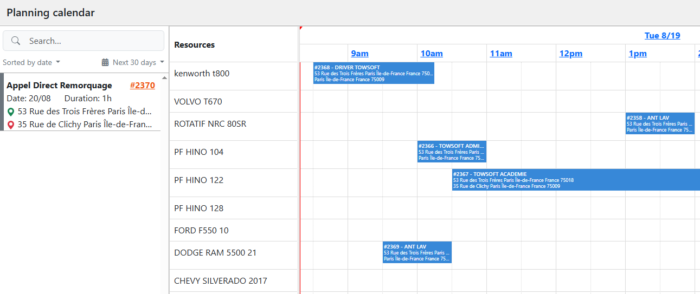
HOW THE PLANNING RESOURCE VIEW WORKS
This tool is accessible from the Scheduled Calls section. Once in this section, you will see a button in the top right corner of your assignments table labeled Planning resource view.

It is important to understand the conditions for displaying calls. Only calls scheduled for today, or those that have not yet been dispatched and are not linked to a trip, will appear in the list on the left side of the calendar. By default the planning calendar will show calls planned for the day, but you can expand the date filter.
In the table on the left, the following information is displayed for each call :
- Service of the call
- Call number (Click to open detailed information)
- Date
- Estimated time for completion
- Manufacturer / Load
- Origin
- Destination(s)
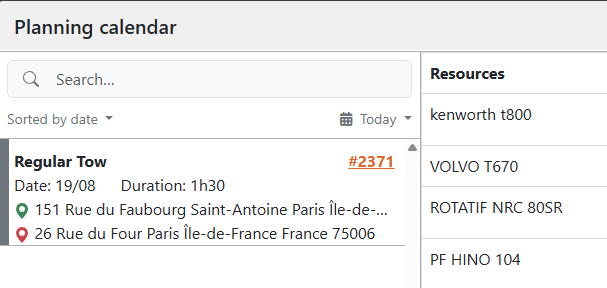
Each call can also have a color indicator representing its priority. If no priority has been set, a gray tag (N/A) will be displayed by default.
HOW THE PLANNING CALENDAR WORKS
The dispatch calendar section offers several useful features to facilitate job management. It allows you to use the drag-and-drop function to easily dispatch jobs to available resources. When a job is dragged into the calendar, a dispatch window will appear allowing you to select the driver and add a trailer or notes if necessary.
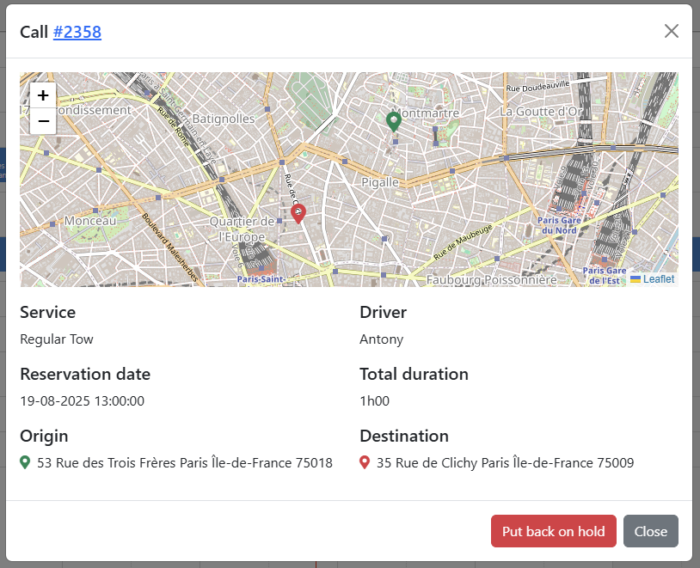
It is also possible to move a future dispatch directly to the calendar or put back the call on hold, simplifying schedule adjustments in the event of a change.
Mobile notifications for drivers
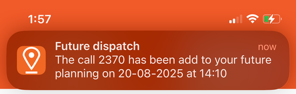
In addition, the system supports automatic notifications to drivers when a pre-scheduled dispatch is made, when a driver is put on hold, or when a driver is reassigned to another vehicle, ensuring smooth, real-time communication.
List of comments