

How to create and use call templates
Objectives of the lesson :
CALL INTAKE TEMPLATES
This new module aims to allow users to create customized templates for call creation in TowSoft in order to accelerate and optimize call intake by dispatch.
ACTIVATION
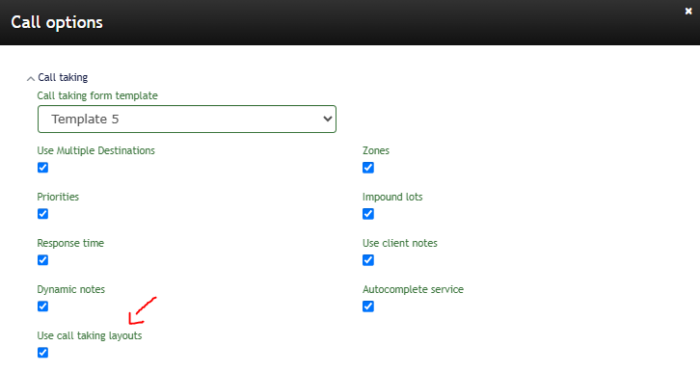
The administrator of the company needs to go in Settings > Companies & options > Call options > Call taking .
Activate the option Use call taking layouts.
CREATING A TEMPLATE
How to add a template?
The management module is accessible via the “Settings” menu under the link “Call taking layout”.
It allows for creating, duplicating, editing, and deactivating templates. This section is available to company administrators.

Press the Add button and enter the name of your new template.
Block management
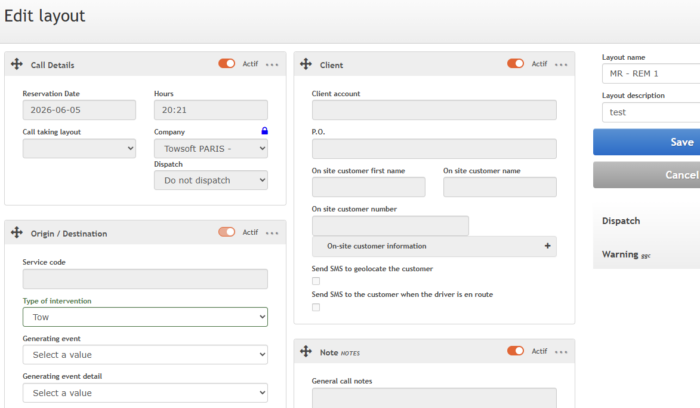
Editing a template allows for renaming block titles as well as their fields. The administrator can choose the order of the blocks via a “drag & drop” system, as well as their visibility.
Field management
For each field, it is possible to define its order, visibility (visible, invisible), and label. It is also possible to make a field mandatory. Mandatory fields must be filled out to allow the call to be submitted.
The system prevents the creation of templates that conflict with the essential functionalities of the call intake page.
USAGE
During call intake, the user can choose between a regular default intake or a call template via a dropdown menu located in the “Call Details” block.
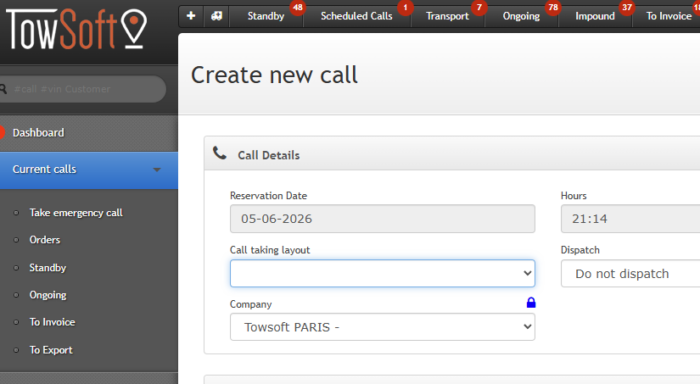
Selecting a specific template instantly modifies the form to display only the blocks and fields pre-configured by the administrator.
This approach speeds up entry by focusing the dispatch’s attention on critical information. Sections not used during call intake can be removed to keep the form simple.
Calls created with the template will still have the other sections afterwards. Therefore, it is possible to create a very simple template for dispatch and then add additional information.
List of comments