

How to configure payment links with the 3DS system.
Objectives of the lesson :
- Learn how to configure payment links via SMS.
- Learn how to configure payment links with the new invoice templates and documents.
- Understanding the customer's payment steps
WHY USE THE 3DS PAYMENTS?
Payments received through Global Payments and Stripe services can sometimes be disputed by customers. To protect against chargebacks, these platforms have developed 3D Secure (3DS) verification, an additional layer of security that authenticates the payment.
When the Stripe or Global Payments gateway with 3DS is enabled in your TowSoft, you have the option to send secure payment links directly in the invoice email or via SMS. This feature simplifies checkout for your customers, improves their experience, and reduces the risk of fraud or claims.
HOW IT WORKS
-
PAYMENT REQUESTS LINK ON DOCUMENTS
With the new TowSoft invoicing template, you can now embed a payment link directly into the email content or at the bottom of the invoice. This link will allow your customers to pay their invoices easily and securely, at no additional cost. To configure this feature, go to your TowSoft interface:
- Go to Settings > Text Editor.
- Tap Add Text.
- Select Email Content or Invoice Footer.
- From the available dynamic fields, select “Link to pay your invoice.”

Once you’ve configured the email content or invoice footer, go to Settings > Document Templates. Then select the invoice template you want to edit. For the email content, choose the new document you created that contains the payment link. If the link needs to appear in the footer, do the same in the dedicated section.

-
SENDING INVOICES, PAYMENT REQUESTS AND RECEIPT
Permission to send an SMS so that the on-site customer can click a link to the invoice (or receipt if invoice is already paid). It should be noted that customers using an integration with a payment gateway will also be able to allow the on-site customer to pay the invoice amount by entering their payment details on their own mobile device.

SMS to customers, options
First, please note that the SMS options discussed above will only appear when a valid phone number is configured for the customer.
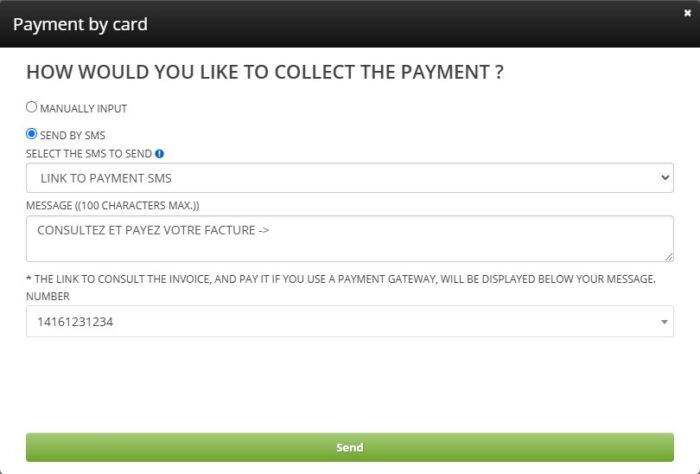
Request for “Payment by Card” in the call screen on the desktop, option to send the payment request via SMS
*Option available only when an integration with a payment gateway is configured
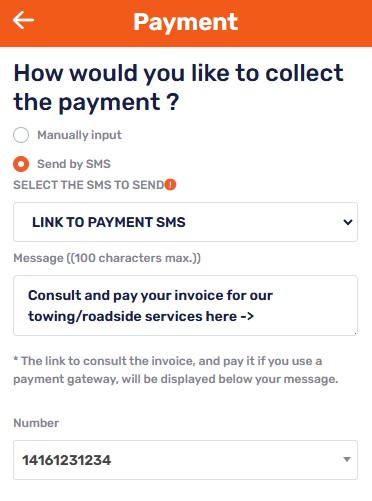
In the Billing tab of the TS4 call sheet, after clicking on “Pay”, then selecting
a credit card, the option to send the payment request via SMS
*Option available only when an integration with a payment gateway is configured
Here are the steps for the customer when they receive a link to pay the invoice via SMS. The language of the SMS will be selected from the customer’s options if an account is already created; otherwise, it will be your company’s language.

The call driver and dispatcher will also receive a notification at each stage of the payment.

Notifications for the dispatch


Notifications for the driver on his mobile phone after sending the payment request

After clicking “Pay”, the recipient will be redirected to a Global Payment or Stripe payment capture page.

After paying, the client can save or print the invoice.
ISSUES WHEN TAKING THE PAYMENT ?
-
What to do in case of timeouts or payment errors?
Ensure that:
The customer’s information matches the card’s information.
The card is valid (expiration date, correct CVV).
The card’s limits have not been exceeded (daily limit, bank block).
The card’s country is accepted by Stripe/Global Payments.
List of comments