

Configuring a numbering system for refunds/credit notes.
Objectives of the lesson :
- Know how to have this feature enabled
- Understand how to configure the refund numbering system
Why use a separate numbering system for refunds?
Your TowSoft software has long allowed you to issue refunds when specific situations present themselves. However, the numbering system that’s currently in place simply re-uses the same number as that of the invoice for which the refund is issued in order to identify it.
This system did not meet the accounting requirements of all of our clients, so they asked us for an option to get a separate numbering for the refunds.
How to activate the numbering of the refunds?
First, the request to activate this numbering system should be made to the TowSoft support team. Contact us here!
How to configure the numbering system of the refunds?
Once this option is activated, it is in the accounting options that you will be able to configure the numbering system to use.
Here is how you get there:
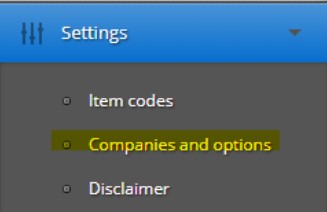
- In the left menu of the desktop version of TowSoft, under the “Settings”, click on “Companies and options”.
- In the “Company List” section at the top of the screen, you may only see one if you only operate from one location, but if you have multiple locations (ie. multi-companies), you must select the one with the gray label that reads “Principal/Main”.
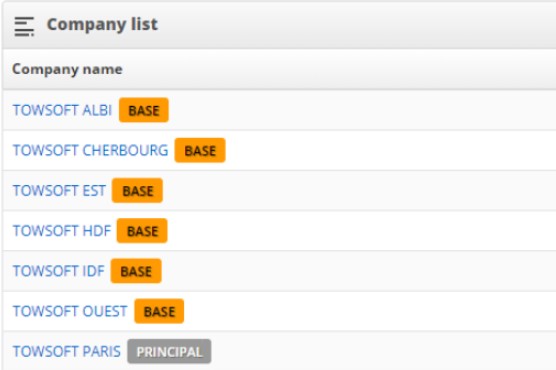
- Click on the name of the main company then, in the next screen, you will find the option “Change the accounting options” among the buttons in the upper right corner.

In the “Refund numbering” section, you will have three fields that will allow you to configure the numbering:
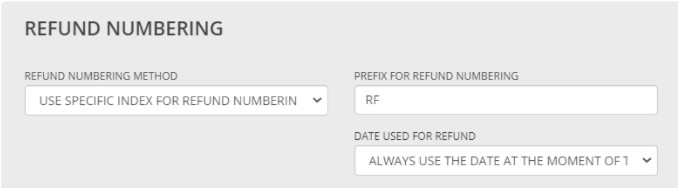
REFUND NUMBERING METHOD
Use the invoices numbering index -> Everything remains as it was when it comes to the number itself. The numbering of the refund will remain based on the parent invoice. However, as you will see below, you could differentiate it with a prefix.
Use specific index for refund numbering -> The numbering of refunds will start from a completely new index, i.e. from 1. Choosing this option will, however, require you to enter a prefix in the following field, otherwise, there would be a possibility that some invoice and refund numbers are the same. Note that if you have configured an invoice numbering reset every month or every year, well, this will also apply to the refund numbering.
Add -1 or -2 at the end of the invoice number -> The refund numbering will be based on the parent invoice, to which, the system will add -1 for a first refund issued, -2 for a second, etc.
PREFIX FOR REFUND NUMBERING
Enter in this field a prefix that you want to see before the refund number eg. “RF” in order to identify them properly. This prefix can be composed of a maximum of 15 alphanumeric characters.
DATE USED FOR REFUND
Always select the date at the moment of the refund -> The date displayed at the beginning of the credit note number will be the date when this credit note was issued.
Always use date of parent invoice -> The date displayed at the beginning of the credit note number will be the date when the invoice was issued.
Finally, click on “Modify” at the bottom of the “Accounting options” window and the new numbering system that you have configured will be put in place from then on.
List of comments