
Learn what a Google API key allows you to do in TowSoft and how to create it yourself.
Objectives of the lesson :
- Understand how this key is used in TowSoft
- Understand why you have to create it and monitor its usage by yourself
- Be able to create your own key in order to send it to us
What is a Google Key and API?
The Google key, which we call an API key in technical jargon, is used so that a technology can communicate directly with Google’s services without having to use their platforms (eg Google Maps).
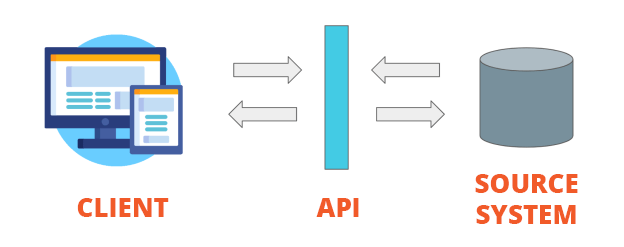
In more general terms, APIs are used to bridge two platforms so that they can exchange information, in real time, in a language that both of them understand.
Why would you want to have this key and why do you have to create it yourself?
The services that are currently used in TowSoft for the autocompletion of addresses and for route calculations sometimes cause dissatisfaction, for example, when the address of a place is not found in the suggested addresses or when the calculated route distance for a call is longer than what is covered by the assistance provider. We chose to use these services because they offer the best quality vs price ratio for all of our customers.
If we were to use our own Google API Key for ALL of our customers – that is if everyone’s usage relied on one key – we just couldn’t do it without increasing the cost of the software.
However, if YOU create your own Google Key and forward it to us, we can integrate it with your TowSoft to connect it with their services and, the best part about it is that it should remain free!
Indeed, Google offers a $200 monthly credit for any key generated by a new account. With the low volume of usage of our towing customers (even the busiest ones), and if Google continues to offer this credit for a long time (which we anticipate), then you should never have to shell out to use your Google Key. However, note that you will still need to enter your credit card information when creating it.
How to create your own Google API key?
Please watch the following tutorial:
How can you make sure that Google’s services never cost you anything ?
As mentioned above, Google offers a monthly credit of $ 200 which should cover the use that our customers make of their services, but we cannot assume, neither the monitoring, nor the coverage of the incurred costs, in the event that it does. there would be. This is the only downside that this entails for our customers.
Please watch the following tutorial on how to monitor your key usage:
If the charge for your usage is approaching $ 200 and you wish to return to the services used by default by our system, please make a request to our support@towsoft.ca
What if I don’t like Google’s services better?
You will always be able to go back to our default services if you don’t like those of Google more. And it won’t cost you anything!
List of comments